When a Wi-Fi router suddenly stops working, most people immediately suspect the router, modem, internet connection, or ISP. But there is another component that is often overlooked: the power adapter.
A failing adapter can cause symptoms that look like a router problem—random reboots, unstable Wi-Fi, intermittent disconnections, or a router that simply refuses to power on. In many cases, replacing the adapter is faster and more economical than replacing the entire networking device.
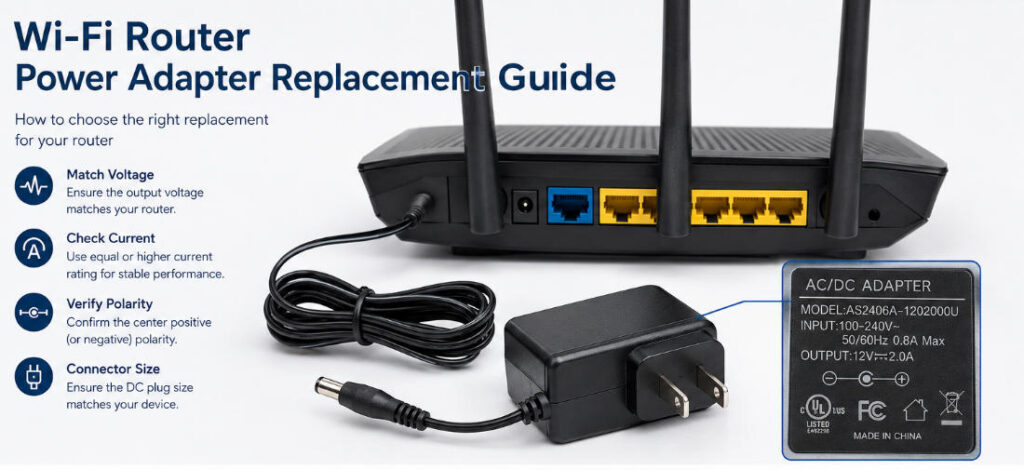
However, a router power adapter replacement cannot be selected based on appearance alone. The replacement needs to match the router’s electrical and mechanical requirements, including output voltage, current rating, DC connector size, polarity, and input requirements.
This guide explains how to identify the correct replacement and avoid the most common compatibility mistakes.
When Should You Replace a Router Power Adapter?
A router power adapter can gradually degrade after years of continuous operation. Because routers are normally powered 24/7, their adapters experience long periods of heat and electrical stress.
Several symptoms may indicate that the adapter should be investigated before replacing the router itself.
1. The router repeatedly restarts
If the router works normally for several minutes and then suddenly reboots, unstable power may be responsible. An aging adapter may no longer maintain stable output voltage when the router’s power demand changes.
2. The router does not power on
If there are no indicator LEDs and the router appears completely dead, check the power adapter, cable, outlet, and DC connector before assuming the router has failed.
3. Wi-Fi becomes unstable under heavy usage
A router may appear normal during light usage but become unstable when multiple devices are connected, data traffic increases, or wireless functions operate at higher loads.
A weak or undersized power adapter may struggle to provide sufficient current during these conditions.
4. The adapter becomes unusually hot
Some operating temperature increase is normal for switching power supplies. However, excessive heat, unusual odors, buzzing, damaged insulation, or visible deformation are warning signs that the adapter should be removed from service.
5. The power cable or connector is damaged
A damaged DC cable or loose connector can create intermittent power. Moving the cable may cause the router to disconnect or restart, which can easily be mistaken for a network problem.
Step 1: Check the Original Router Power Adapter
Before purchasing a replacement, inspect the label on the original adapter.
Look for specifications such as:
- Input: 100–240V AC, 50/60Hz
- Output: 12V DC
- Current: 1A, 1.5A, 2A, etc.
- Polarity symbol
- Model number
- Manufacturer information
- Safety certification marks
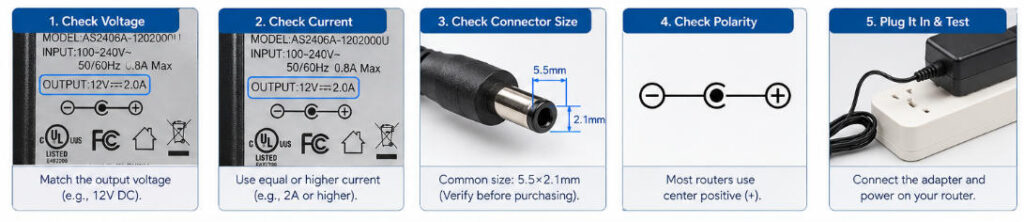
The output information is particularly important.
For example, an adapter marked:
Output: 12V ⎓ 2A
means that the adapter provides a regulated 12V DC output and is rated to supply up to 2A.
Do not choose a replacement simply because it has the same physical connector. Electrical compatibility must be verified first.
If you are dealing with a 12V device, our detailed guide to choosing the correct 12V power adapter provides additional information about voltage, current, connector requirements, efficiency, and safety considerations.
Step 2: Match the Output Voltage Exactly
Voltage is one of the most important specifications when selecting a router power adapter replacement.
If the router requires 12V DC, the safest choice is a properly regulated 12V DC adapter.
For example:
| Router Requirement | Replacement |
|---|---|
| 12V DC | 12V DC |
| 9V DC | 9V DC |
| 5V DC | 5V DC |
Avoid assuming that a similar voltage will work.
Using an adapter with a significantly higher output voltage can damage sensitive electronic components. Using a lower voltage adapter may cause the router to malfunction, restart, or fail to operate correctly.
For this reason, voltage should normally be treated as a must-match specification, not an area for experimentation.
Step 3: Understand the Current Rating
Current rating is slightly different from voltage.
Suppose a router requires:
12V 1A
A properly regulated:
- 12V 1A adapter
- 12V 1.5A adapter
- 12V 2A adapter
can generally be suitable, assuming the connector and polarity are correct.
The router does not automatically receive the full rated current of the adapter. The device draws the current it requires.
However, the opposite situation is not recommended.
A 12V 0.5A adapter should not be used to replace a router requiring 12V 1A. The undersized adapter may overheat, shut down, or cause unstable operation.
This distinction is especially important when purchasing replacement adapters online, where sellers may list several adapters with the same voltage but different current capacities.
Step 4: Check the DC Connector Size
Electrical specifications can be correct while the replacement still fails to fit.
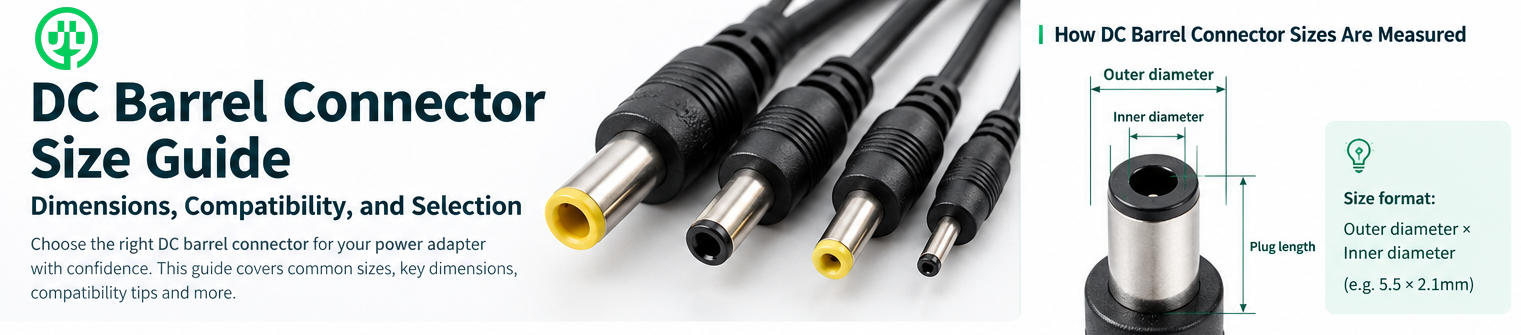
That is because routers can use different DC barrel connector dimensions.
Common barrel plug measurements include combinations such as:
- 5.5 × 2.1mm
- 5.5 × 2.5mm
- Other manufacturer-specific sizes
The outside diameter alone is not enough to identify the correct connector.
A 5.5mm outer diameter plug with a 2.1mm inner diameter is physically different from a 5.5mm × 2.5mm plug.
Even when two connectors look almost identical, the center pin may not make proper electrical contact.
If you are replacing an adapter for a commercial router model, always verify the connector specification from the manufacturer’s documentation or measure the original connector before ordering.
Step 5: Verify DC Polarity
Polarity is another specification that should never be ignored.
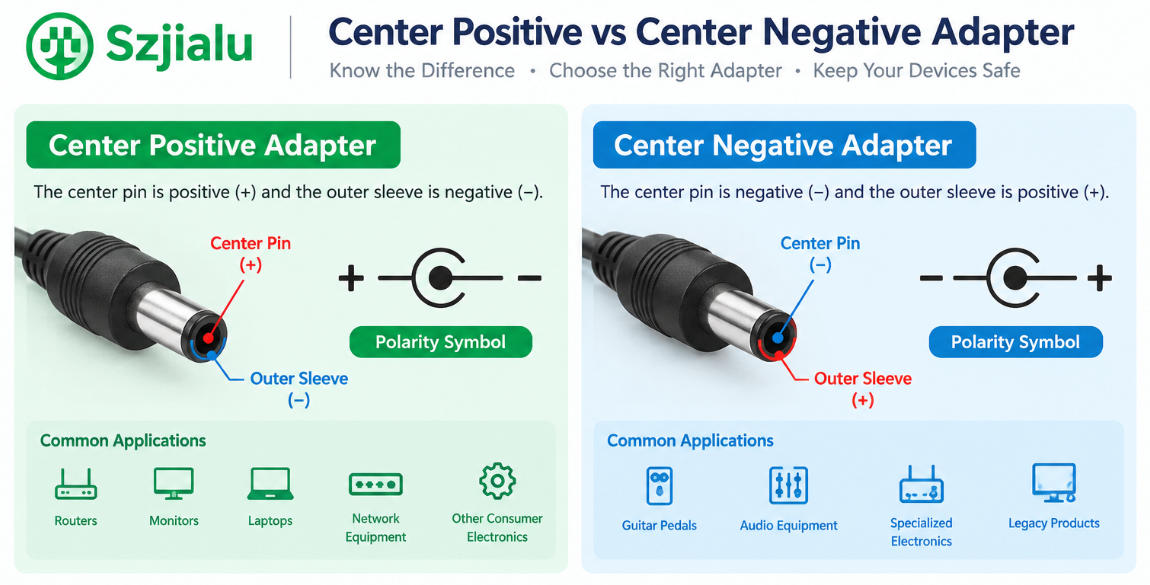
Many consumer routers use a center-positive DC barrel connector, but this should not be assumed for every device.
The adapter label normally contains a polarity diagram showing the relationship between the center pin and outer sleeve.
For example:
Center positive (+)
is commonly represented by a diagram connecting the positive symbol to the center of the barrel plug.
A replacement adapter should have the same polarity as the original device.
Matching voltage and current while using the wrong polarity can cause serious problems, including failure to start or potential damage to the router’s input circuitry.
Step 6: Check the Input Requirements
For replacement adapters used in different countries or regions, input compatibility is also important.
A universal-input adapter rated for:
100–240V AC, 50/60Hz
can generally support electrical systems across a wide range of markets, provided the correct mains plug configuration is used.
This is particularly useful for networking equipment sold internationally.
For manufacturers, distributors, and system integrators, a universal-input AC/DC adapter can simplify product deployment across different regions and reduce the number of power supply variants that need to be stocked.
Can You Use a Higher-Amp Adapter for a Router?
This is one of the most common questions during a router power adapter replacement.
In general, a replacement adapter can have a higher current rating than the original requirement, provided that:
- Output voltage matches.
- Output polarity matches.
- DC connector is compatible.
- The adapter is properly regulated.
- The adapter meets the device’s other electrical requirements.
For example, if a router requires 12V 1A, a properly designed 12V 2A adapter can normally provide sufficient capacity.
The important point is that higher current capacity is not the same as higher output voltage.
Increasing the voltage is potentially dangerous. Increasing the available current capacity, while keeping the voltage correct, is generally much less problematic.
Is a Universal Power Adapter a Good Replacement?
Universal adapters can be useful when the original adapter is unavailable, particularly when they provide interchangeable DC connectors and adjustable output specifications.
However, “universal” does not automatically mean “compatible.”
Before using one, confirm:
- Output voltage
- Current capacity
- DC connector
- Polarity
- Plug configuration
- Regulation quality
- Protection features
For long-term installations, a dedicated fixed-output AC/DC adapter is often preferable because its electrical specifications are clearly defined and optimized for a specific application.
For B2B equipment manufacturers, the choice between fixed-output and interchangeable-plug designs should also consider regional markets, packaging, inventory, certification, and production volume.
Choosing a Reliable Replacement Power Adapter
Price should not be the only consideration when replacing a router power adapter.
A reliable adapter should provide stable voltage regulation and appropriate protection against abnormal operating conditions.
Depending on the product design, useful protection features may include:
- Short-circuit protection
- Over-current protection
- Over-voltage protection
- Over-temperature protection
- Input surge protection
Certification requirements are also important for products entering different international markets.
For example, Szjialu’s power adapter portfolio includes products designed for international markets with certifications such as UL, FCC, CE, UKCA, KC, SAA, PSE, and CCC, depending on the specific model and target market.
For buyers looking for a broader range of models, the power adapter category on Szjialu provides access to wall-mount adapters, desktop power supplies, interchangeable-plug adapters, and USB power solutions.
Example: 12V 2A Router Power Adapter
A 12V 2A adapter is a common power specification for networking and communication equipment.
For example, Szjialu’s 24W AC/DC power adapter provides a 12V 2A output option and includes protection features such as short-circuit, over-current, over-voltage, and over-temperature protection.
The product is also designed for applications including network routers and communication equipment. However, compatibility should always be confirmed against the specific router’s requirements rather than selecting a product based only on the application category.
For commercial buyers, the 24W AC/DC power adapter can also serve as a reference point when evaluating output specifications, certifications, plug configurations, and OEM/ODM possibilities.
Router Power Adapter Replacement: Common Mistakes to Avoid
A few mistakes appear repeatedly when replacing router power supplies.
Choosing by connector size only
A plug that fits physically may still have the wrong voltage or polarity.
Choosing a lower-current adapter
A lower current rating can cause instability, especially when the router reaches higher power demand.
Assuming every 12V adapter is interchangeable
Two 12V adapters may have completely different connector sizes, polarity, regulation characteristics, and certification status.
Using a cheap unverified adapter
Low-quality power supplies can introduce excessive ripple, unstable voltage, overheating, or inadequate protection.
Ignoring the original specifications
The router’s label or manufacturer’s documentation should always be the starting point for replacement selection.
When Should Businesses Consider a Custom Power Adapter?
For individual consumers, replacing a single router adapter is usually straightforward once the specifications are confirmed.
For router manufacturers, telecom equipment companies, network integrators, and distributors, the requirements can be more complex.
A commercial project may require:
- Custom output voltage
- Specific DC connector
- Regional AC plugs
- Customized cable length
- Safety certifications
- Private labeling
- Packaging customization
- Different power ratings
- OEM or ODM production
This is where working directly with a power adapter manufacturer can be more efficient than adapting an off-the-shelf consumer product.
Szjialu develops and manufactures AC/DC power adapters across multiple power ranges and supports customized power supply ODM projects. Its current product portfolio covers various switch-mode power adapters from 5W to 240W, alongside USB and PD charging solutions.
Final Checklist for a Router Power Adapter Replacement
Before connecting a replacement adapter to your router, verify these specifications:
Voltage: Must match the router’s requirement.
Current: Should meet or exceed the router’s required current.
Connector: Must physically and electrically match.
Polarity: Must be identical to the original requirement.
Input: Should support the local AC mains voltage and frequency.
Protection: Prefer a properly regulated adapter with appropriate protection functions.
Certification: Important for commercial products and international distribution.
If all of these specifications are confirmed, replacing the power adapter can be a simple way to restore reliable router operation without replacing the entire networking device.
For businesses sourcing networking power supplies at scale, the same principles apply—but additional factors such as certification, customization, production consistency, and long-term supply stability become equally important.
As an experienced power supply manufacturer, Szjialu provides AC/DC power adapters and customized OEM/ODM solutions for networking equipment, consumer electronics, industrial devices, and other applications. The goal is not simply to provide a replacement adapter, but to deliver a power solution matched to the electrical, mechanical, and market requirements of the final product.