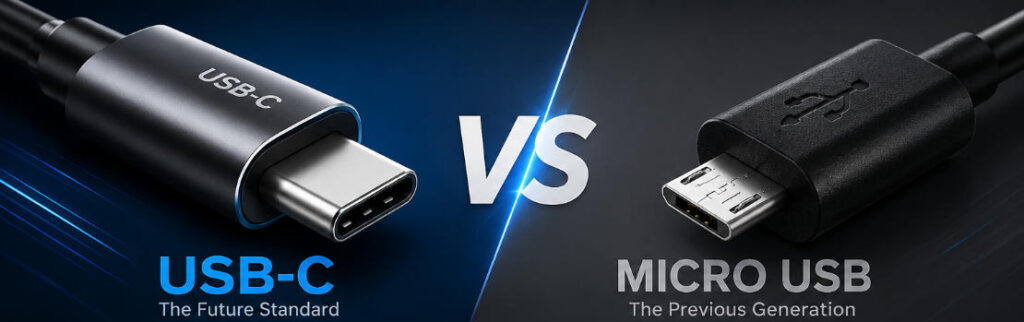
As smartphones, laptops, tablets, and countless smart devices continue to evolve, USB connectors have become an essential part of everyday life. For many years, Micro USB was the standard charging interface for Android devices, Bluetooth accessories, cameras, and power banks. Today, however, USB-C has largely replaced Micro USB across consumer electronics thanks to its faster charging, higher data transfer speeds, and reversible design.
If you’re comparing USB-C vs Micro USB, understanding the differences can help you choose the right charger, cable, or electronic product—whether you’re a consumer or sourcing products for your business.
This guide explains everything you need to know, from technical specifications to real-world performance and future industry trends.
What Is USB-C?
USB-C (USB Type-C) is the latest universal USB connector developed by the USB Implementers Forum (USB-IF). Unlike previous USB connectors, USB-C supports:
- High-speed data transfer
- Fast charging through USB Power Delivery (USB PD)
- Video output
- Audio transmission
- Universal compatibility across multiple device types
Today, USB-C is found on:
- Smartphones
- Tablets
- Laptops
- Gaming consoles
- Monitors
- External SSDs
- Docking stations
- GaN chargers
Modern USB-C PD chargers can deliver up to 240W under the latest USB PD 3.1 specification, making them suitable for everything from smartphones to high-performance laptops.
If you’re looking for professional charging solutions, explore Szjialu’s USB-C Charger Collection
What Is Micro USB?
Micro USB was introduced in the late 2000s and quickly became the universal charging connector for Android smartphones.
For over a decade it powered:
- Mobile phones
- Bluetooth speakers
- Wireless headphones
- GPS devices
- Digital cameras
- Power banks
- E-readers
Although still available on budget electronics and industrial equipment, Micro USB is gradually disappearing as USB-C becomes the global standard.
USB-C vs Micro USB: Quick Comparison
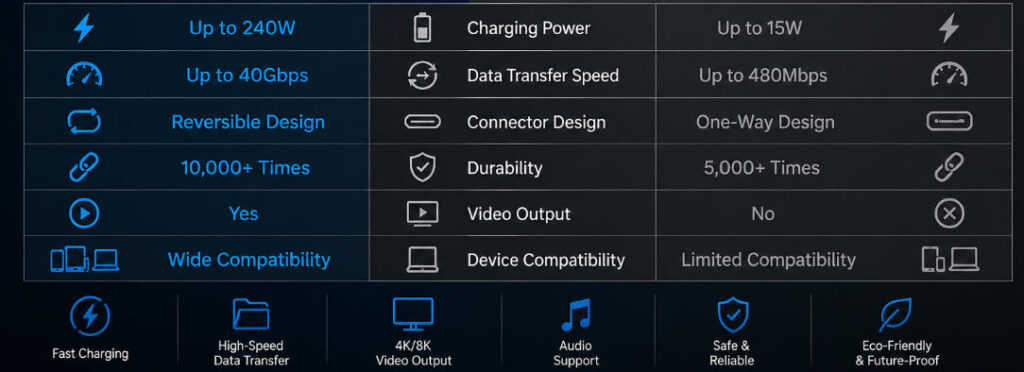
| Feature | USB-C | Micro USB |
|---|---|---|
| Connector Orientation | Reversible | One-way only |
| Charging Speed | Up to 240W | Usually up to 15W |
| Data Speed | Up to 40Gbps (USB4) | Up to 480Mbps |
| Durability | 10,000+ insertions | Around 5,000 insertions |
| Video Output | Yes | No |
| Audio Support | Yes | Limited |
| Laptop Charging | Yes | No |
| Future Compatibility | Excellent | Becoming obsolete |
Design Differences
One of the biggest improvements USB-C introduced is its reversible connector.
Unlike Micro USB, which only plugs in one direction, USB-C can be inserted either way.
Benefits include:
- Faster connection
- Less connector damage
- Better user experience
- Reduced wear over time
This seemingly simple improvement has significantly enhanced usability across millions of devices.
Charging Performance
Charging speed is perhaps the biggest difference between USB-C and Micro USB.
Micro USB was originally designed before fast charging became common. Most Micro USB devices support between 5W and 15W, depending on the charging protocol.
USB-C, on the other hand, supports modern fast charging technologies including:
- USB Power Delivery (USB PD)
- Programmable Power Supply (PPS)
- Qualcomm Quick Charge (via compatible devices)
A high-quality 100W USB-C PD Charger can simultaneously charge laptops, tablets, and smartphones safely and efficiently.
Data Transfer Speed
Data transfer capabilities differ dramatically.
Micro USB
Typically supports:
- USB 2.0
- Maximum 480Mbps
Suitable for:
- Charging
- Basic file transfers
USB-C
USB-C supports multiple USB standards:
- USB 3.2
- USB4
- Thunderbolt (compatible devices)
Maximum speeds include:
- 5Gbps
- 10Gbps
- 20Gbps
- 40Gbps
This makes USB-C ideal for:
- Video editing
- External SSDs
- Large backups
- Professional photography
Device Compatibility
Today USB-C supports nearly every major device category.
Examples include:
- iPhone 15 and newer
- Android smartphones
- MacBook
- Windows laptops
- Steam Deck
- Nintendo Switch
- Portable monitors
- Professional cameras
Micro USB is now mostly limited to:
- Older Android phones
- Budget accessories
- Legacy industrial equipment
Durability Comparison
Frequent plugging and unplugging eventually wears out any connector.
USB-C offers significant improvements:
- Stronger connector design
- Better mechanical stability
- Around twice the insertion lifespan
This is particularly important for business users who charge devices multiple times every day.
Why Manufacturers Prefer USB-C
Many manufacturers have switched entirely to USB-C because it allows one cable to handle multiple tasks.
Advantages include:
- Faster charging
- Higher efficiency
- Reduced cable clutter
- Better compatibility
- Lower long-term support costs
For OEM and ODM manufacturers, USB-C also simplifies product development by adopting a globally accepted interface.
As a professional charger manufacturer, Szjialu provides customized USB-C charging solutions for global brands, wholesalers, and OEM partners.
Environmental Benefits
USB-C also supports sustainability initiatives.
The European Union has adopted USB-C as the common charging standard for many consumer electronics, helping reduce electronic waste by allowing users to reuse chargers across multiple devices.
Benefits include:
- Fewer discarded chargers
- Reduced cable waste
- Lower manufacturing costs
- Better consumer convenience
Should You Still Buy Micro USB Products?
It depends on your needs.
Micro USB remains suitable for:
- Replacing existing accessories
- Older equipment
- Budget electronics
- Legacy industrial devices
However, if you’re purchasing a new smartphone, tablet, laptop, or charger, USB-C is undoubtedly the better long-term investment.
Which Connector Is Better for Business Buyers?
For distributors, retailers, and OEM brands, USB-C offers several competitive advantages:
- Higher customer demand
- Better future compatibility
- Premium product positioning
- Support for fast charging
- Compliance with evolving international regulations
Businesses planning new product lines should prioritize USB-C to remain competitive in the global market.
Frequently Asked Questions
Is USB-C faster than Micro USB?
Yes. USB-C supports significantly faster charging and much higher data transfer speeds than Micro USB.
Can USB-C replace Micro USB?
Yes. Most new smartphones, tablets, laptops, and accessories have already transitioned to USB-C.
Is USB-C more durable?
Yes. USB-C connectors typically withstand over 10,000 insertion cycles, roughly double the lifespan of Micro USB connectors.
Can USB-C charge laptops?
Yes. USB-C with USB Power Delivery can safely charge laptops up to 240W, depending on device compatibility.
Why is Micro USB disappearing?
Consumers demand faster charging, higher data speeds, and universal compatibility, making USB-C the preferred standard.
Conclusion
When comparing USB-C vs Micro USB, the winner is clear. USB-C delivers faster charging, dramatically improved data transfer speeds, greater durability, and broader compatibility with today’s devices. While Micro USB still serves legacy products, it is steadily being phased out in favor of USB-C across nearly every consumer electronics category.
For businesses sourcing charging solutions, adopting USB-C products ensures better long-term compatibility, stronger market demand, and compliance with evolving global standards. Whether you’re developing OEM products or purchasing wholesale chargers, investing in high-quality USB-C technology is the smartest choice for the future.
At Szjialu, we specialize in reliable USB-C charging solutions, including fast chargers, GaN chargers, and OEM/ODM services designed for international brands and distributors.