A power adapter is easy to overlook until it needs replacing. For a Starlink Standard Gen 3 setup, choosing another unit by appearance alone can lead to a frustrating result: a plug that looks close but does not fit, or an adapter with an electrical rating that does not match the equipment.
The AS260WA-57003420DH is a desktop power adapter intended for Starlink Standard Gen 3 setups with a matching power input. Its label specifies 100–240V AC, 50/60Hz input and 57.0V DC, 3.42A output. Those figures are the starting point for evaluating it as a replacement or spare.
This guide explains what the specifications mean, what to check before ordering, and which details matter when sourcing adapters for multiple installations.

AS260WA-57003420DH specifications at a glance
| Item | Specification |
|---|---|
| Model | AS260WA-57003420DH |
| Product type | Desktop AC/DC power adapter |
| AC input | 100–240V, 50/60Hz |
| DC output | 57.0V, 3.42A |
| Calculated rated output | 194.94W, commonly rounded to 195W |
| Intended application | Starlink Standard Gen 3 setup with a matching power input |
The output rating is calculated directly from the label: 57.0V × 3.42A = 194.94W. Calling it a 195W adapter is a convenient shorthand, but the voltage, current and connector remain the more useful details when checking compatibility.
Why the power supply deserves a closer look
Starlink’s Standard Kit uses a separate power supply as part of its equipment setup. That makes the adapter a component buyers may need to identify and replace independently. Starlink also uses different hardware and kit names, so “Gen 3” by itself is not a complete compatibility specification. Its kit identification guide is a useful starting point if you are unsure which equipment you own.
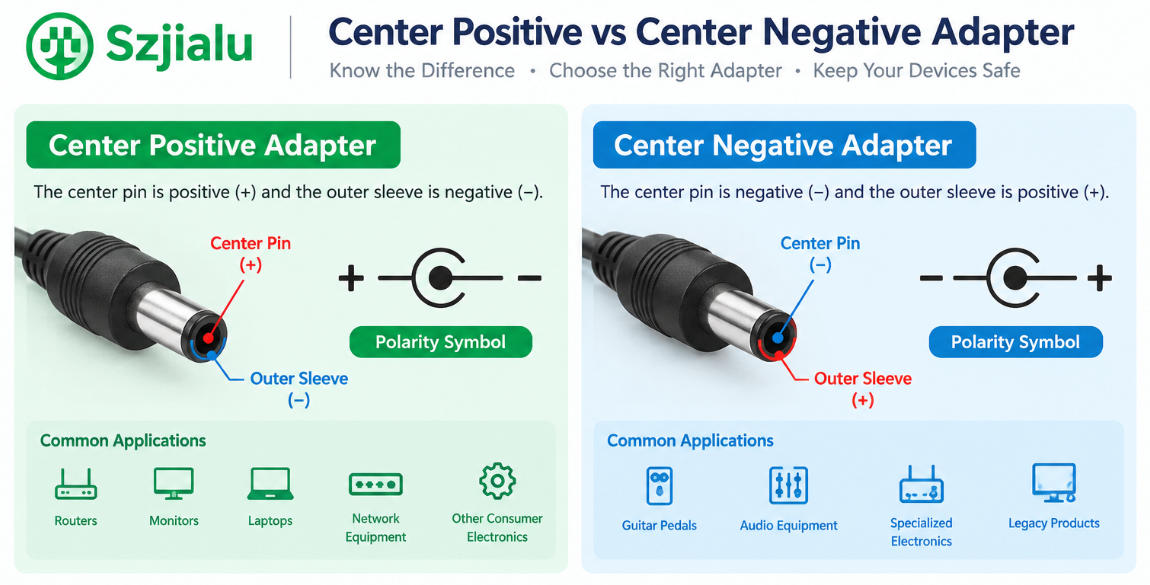
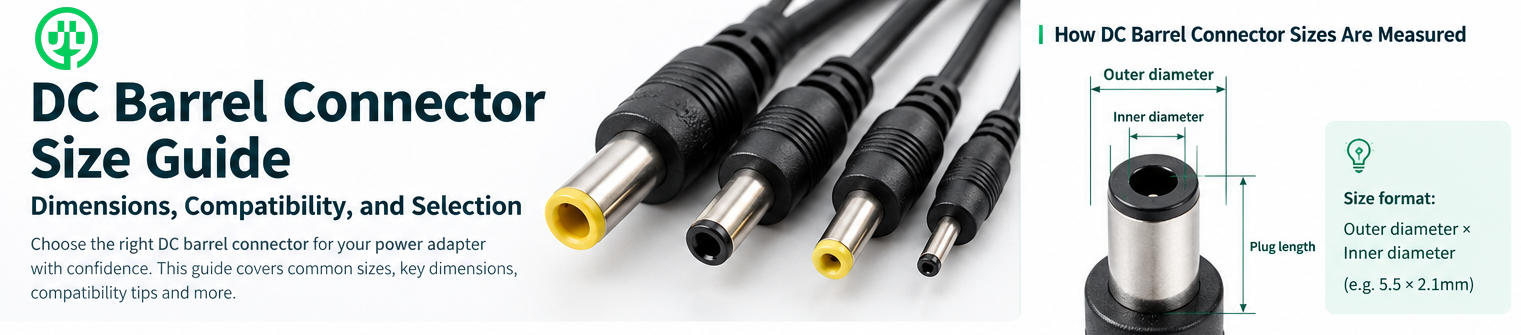
A correct replacement needs to satisfy two requirements at once. Electrically, it must provide the voltage and suitable current capacity expected by the equipment. Mechanically, its DC connector must match the device’s power port, including the relevant dimensions and polarity. A connector that can be pushed into a port is not, by itself, proof of a correct match.
For a single replacement, checking these details can prevent a wasted order. For an installer or distributor supplying multiple sites, documenting them clearly can also reduce returns and support questions.
What does the 57V, 3.42A rating mean?
57.0V DC is the adapter’s stated output voltage. The equipment’s required input voltage should be checked against it directly. A supply with a higher wattage but a different voltage is not an interchangeable substitute.
3.42A is the adapter’s rated output current. It describes how much current the adapter is specified to provide, not an amount that it continuously pushes into the connected equipment. Current drawn in use depends on the equipment’s operating conditions.
Together, the two numbers produce a rated output capacity of 194.94W. This does not mean the system constantly consumes 194.94W, nor is it a prediction of an electricity bill. It is the adapter’s calculated output rating. Buyers evaluating operating energy use should consult specifications for their exact Starlink kit and usage conditions rather than treating the adapter’s maximum rating as normal consumption.

What the 100–240V AC input offers
The adapter’s 100–240V AC, 50/60Hz input covers common mains voltage and frequency systems used in many regions. This matters to businesses that source equipment for more than one market: the same electrical input range may be suitable across different destinations.
The input range does not tell you which wall plug or AC cord is supplied. When requesting a quotation or preparing a product listing, confirm the cord type for the destination country and state clearly whether an AC cord is included. Also check that the cord mates with the adapter’s AC inlet.
For buyers replacing one unit, the simplest comparison is the label on the existing supply. For volume orders, the AC cord, plug and packaging should be specified alongside the adapter model.
Five checks before ordering a replacement
1. Identify the exact Starlink equipment
Start with the kit and router model, rather than relying only on a phrase such as “Starlink Gen 3.” Starlink sells several Standard and Performance configurations. Their power arrangements should not be assumed to be identical. If the original adapter is available, photograph its full label and both connectors.
2. Match the output voltage
Compare the required DC input of the equipment with the replacement adapter’s 57.0V output. Do not substitute a different voltage simply because the plug appears similar or the wattage number is higher.
3. Check current capacity and rated power
The AS260WA-57003420DH is rated at 3.42A, equivalent to 194.94W at 57.0V. Compare that rating with the requirements of the equipment you intend to power. In a purchasing specification, record voltage and current separately; writing only “195W” leaves too much room for an incorrect substitution.
4. Verify the DC connector and polarity
Inspect the connector’s physical form, dimensions and polarity against the original adapter and the device power port. The product photographs show the output lead and its protective cap, but photographs cannot establish exact plug dimensions or polarity. Request a connector drawing or measured specification when these details are not already documented.
5. Confirm what comes in the package
A listing should state whether it includes the adapter, AC cord and any other accessories. This is especially useful for replacement buyers who may no longer have the original cord, and for distributors building a consistent sales package.
A closer look at the physical design
The supplied product images show a rectangular desktop-style unit with an attached DC output lead, a barrel-style connector and a separate protective cap. The adapter can be positioned flat or on its edge for product photography, but the photos do not establish an approved mounting orientation for operation.
The connector cap is a useful detail to show in a product listing because buyers may otherwise mistake it for an additional electrical part. Clear photographs of the adapter face, AC inlet, DC connector and underside label will help customers compare the product with the supply they are replacing.
The photos and the electrical label do not establish an environmental protection rating for this particular model. Installation instructions and any model-specific rating should be confirmed before describing it as suitable for exposed outdoor use.
What distributors and purchasing teams should request
For a single replacement, a label comparison may be enough to begin an inquiry. A purchasing team needs a fuller specification that can be checked repeatedly across shipments. Before placing a volume order, request confirmation of:
- The exact model and rated AC input and DC output
- DC connector dimensions and polarity
- Output cable length and configuration
- AC inlet and destination-market cord options
- What is included in the retail or bulk package
- Model-specific test reports and applicable certification documents
- Label artwork and any required regional markings
- Sample availability and the process for confirming fit with the target equipment
These are questions to resolve for the AS260WA-57003420DH itself. A manufacturer’s general portfolio or company certifications should not be treated as certification of every individual adapter model.
Jialu’s desktop power supply range and OEM service provide context for buyers discussing adapter specifications and sourcing requirements.
Frequently asked questions
Is 194.94W the amount of electricity the Starlink system always uses?
No. It is the adapter’s calculated rated output: 57.0V multiplied by 3.42A. Actual power use depends on the connected equipment and operating conditions.
Will any 195W power adapter work?
No. Two adapters can have the same wattage while providing different voltages or using different connectors. Check voltage, current rating, connector dimensions and polarity.
Does “100–240V input” mean every country’s power cord is included?
No. It states the adapter’s AC electrical input range. The supplied cord and wall plug need to be confirmed separately.
Does this adapter fit every product described as “Starlink Gen 3”?
That should not be assumed. Confirm the exact kit, router power input and connector before purchase. If there is any uncertainty, provide photographs of the existing adapter label and connector when making an inquiry.
Is the adapter rated for outdoor installation?
The specifications provided for this article do not establish an outdoor or IP rating for this model. Request model-specific documentation before making that claim or planning an exposed installation.
Find the right fit before you buy
The AS260WA-57003420DH brings a clearly stated set of electrical specifications to a Starlink Standard Gen 3 replacement inquiry: 100–240V AC input and 57.0V, 3.42A DC output, with a calculated 194.94W rating. The next step is to verify the connector and exact equipment configuration.
If you are replacing one adapter, comparing the original unit’s label and connector is the best place to start. If you are sourcing for distribution or multiple installations, send Jialu the target equipment details, connector requirements, destination market and expected quantity. Contact Jialu to discuss the specifications and documentation available for this model.