AC DC power adapters are used in routers, monitors, LED lighting, security cameras, medical equipment, consumer electronics, industrial controllers, and countless other devices. Although a quality adapter can operate reliably for years, incorrect specifications, poor ventilation, damaged cables, unstable input power, and component aging can eventually cause performance problems.
Some faults are easy to identify, such as a broken cable or loose connector. Others are more difficult because the adapter may continue working intermittently while producing unstable voltage, excessive heat, electrical noise, or insufficient current.
Understanding the most common AC DC power adapter problems helps users troubleshoot equipment safely and allows product manufacturers to prevent failures during the design stage.
This guide explains the typical symptoms, possible causes, safe troubleshooting steps, and situations in which an adapter should be replaced. It also discusses how selecting a properly designed power supply from an experienced manufacturer such as Szjialu can reduce field failures and improve product reliability.

How Does an AC DC Power Adapter Work?
An AC DC power adapter converts alternating current from a wall outlet into the regulated direct current required by electronic equipment.
A typical switching adapter contains:
- An AC input and rectification stage
- Filtering and electromagnetic-interference components
- A high-frequency switching circuit
- A transformer for voltage conversion and isolation
- A secondary rectification circuit
- Output-voltage regulation and feedback components
- Overvoltage, overcurrent, short-circuit, and thermal protection
- An output cable, connector, and enclosure
A problem in any of these areas can prevent the adapter from delivering stable power.
Before troubleshooting, users should confirm that the adapter has the correct voltage, current capacity, polarity, connector dimensions, and input range. The Szjialu guide on how to choose the right AC DC power adapter explains these basic compatibility requirements in greater detail.
1. The Power Adapter Does Not Work
The most obvious problem is an adapter that produces no power at all.
Common symptoms include:
- The connected device does not turn on
- A charging indicator remains off
- The adapter’s LED does not illuminate
- No output voltage is detected
- The device works with another compatible adapter
Several issues can cause complete power loss.
Dead or Unstable Wall Outlet
The adapter may be working correctly, while the wall outlet, extension cable, or power strip has failed.
Test the outlet with another appliance. When using a switched power strip, make sure it is turned on and that its overload protection has not been triggered.
Loose AC Plug
A wall-mount adapter may not remain firmly seated in a worn outlet. Desktop adapters can also lose power when the detachable AC cord is not fully inserted.
Disconnect and reconnect each plug securely. Do not continue using an outlet that feels loose, produces sparks, or shows burn marks.
Broken Output Cable
Repeated bending near the adapter enclosure or DC connector can break the internal copper conductors. The outer insulation may still look normal even when the wires inside are damaged.
If the device powers on only when the cable is held at a particular angle, the cable is probably failing. The safest solution is to replace the adapter rather than repeatedly bending or taping the damaged section.
Internal Component Failure
A blown fuse, failed switching component, damaged capacitor, or open circuit can stop the adapter completely. Internal failures may occur after a surge, overheating event, short circuit, or long period of service.
Sealed adapters should not be opened by unqualified users. Internal components may retain dangerous voltage even after the adapter has been unplugged.

2. The Adapter Works Intermittently
An intermittent adapter may power the device normally at one moment and disconnect unexpectedly at another.
Possible causes include:
- A damaged DC cable
- A loose connector
- A worn device power jack
- A detachable AC cord with poor contact
- Thermal protection repeatedly activating
- Cracked solder joints inside the adapter
- A load that temporarily exceeds the rated output
To isolate the problem, keep the device stationary and gently check each external connection. Avoid aggressively twisting the cable, because doing so can worsen internal damage.
If the adapter shuts down during high-load operation but restarts after being unplugged, it may be entering overcurrent or thermal protection. This often indicates that the adapter is undersized, defective, or being used in an environment with inadequate cooling.
3. The AC DC Power Adapter Is Overheating
It is normal for a switching power adapter to become moderately warm. However, it should not become so hot that it is painful to touch, gives off an unusual odor, discolors nearby material, or repeatedly shuts down.
Common causes of overheating include:
Insufficient Power Capacity
An adapter operating close to or above its maximum rating generates more heat.
For example, a device requiring 12V and 4A should not be powered by a 12V 2A adapter. Although the voltage matches, the adapter cannot safely provide the required current.
Select an adapter with the correct voltage and sufficient continuous current capacity. For common 12V applications, consult the 12V power adapter selection guide.
Poor Ventilation
Placing an adapter under bedding, inside a closed cabinet, behind heat-producing equipment, or directly against soft material can prevent heat from escaping.
Keep the enclosure exposed to circulating air. Do not cover it during operation.
High Ambient Temperature
An adapter used in direct sunlight, near heating equipment, or inside an unventilated enclosure may exceed its intended operating temperature even when the electrical load is acceptable.
Industrial and commercial products should be evaluated under realistic worst-case environmental conditions, not only at room temperature.
Aging Components
Electrolytic capacitors gradually deteriorate with time and temperature. As components age, ripple may increase, efficiency may decrease, and the adapter may run hotter.
For additional information about aging and operating conditions, see how long an AC DC power adapter lasts.
Immediately unplug an adapter that produces smoke, a burning smell, melting, cracking, or excessive heat.
4. The Adapter Makes a Buzzing, Humming, or Clicking Noise
A faint high-frequency sound may occur in some switching power supplies because magnetic components can vibrate during operation. Nevertheless, loud, newly developed, or irregular noise may indicate a problem.
Possible causes include:
- Transformer or inductor vibration
- Poor component fastening
- Operation at a very light or unstable load
- Overload protection cycling on and off
- A short circuit in the connected device
- Deteriorating capacitors
- Unstable mains input
Clicking combined with repeated device restarts often means the adapter is trying to start, detecting a fault, shutting down, and trying again.
Disconnect the adapter from the device. If the noise disappears, the device or its load may be causing the problem. If the noise continues when unloaded, replacement or professional evaluation is advisable.
Do not ignore noise accompanied by heat, odor, unstable output, or visible enclosure damage.
5. The Output Voltage Is Too Low or Unstable
An adapter may appear to operate but fail to maintain its rated output under load. This can cause:
- Random device restarts
- Screen flickering
- Router disconnections
- LED flicker
- Audio noise
- Slow motor operation
- Charging interruptions
- Communication errors
Low voltage may result from an overloaded adapter, excessive cable resistance, damaged connectors, degraded capacitors, or a poorly regulated power supply.
Output voltage measured without a load does not always reveal the problem. An adapter may show the correct voltage when disconnected but drop significantly after the device begins drawing current.
Technicians can test the output with a suitable multimeter and controlled load. Ordinary users should compare the adapter with a known compatible replacement rather than attempting internal repairs.
Applications requiring consistent voltage should use a properly regulated supply. The article universal power adapter vs regulated power adapter explains why input compatibility and output regulation are different specifications.
6. The Device Charges Slowly
Slow charging does not always mean that the adapter is defective. It may indicate that the available power is lower than the device requires.
Common reasons include:
- Insufficient adapter wattage
- A cable with excessive resistance
- A connector with poor contact
- Unsupported charging protocol
- The device reducing current because of temperature
- Power being shared between multiple outputs
- Battery-management limitations inside the device
For fixed-voltage barrel-connector adapters, verify the rated voltage and current. For USB-C equipment, confirm that the charger, cable, and device support the required Power Delivery profile.
For example, a laptop that needs 20V at 3.25A requires a compatible 65W USB-C PD output. A charger labeled “fast charger” may still charge slowly if it does not support the device’s requested voltage profile.
Szjialu’s guide to USB-C Power Delivery and fast charging provides more detail about charging negotiation, power profiles, and cable capability.

7. The Connector Does Not Fit or Feels Loose
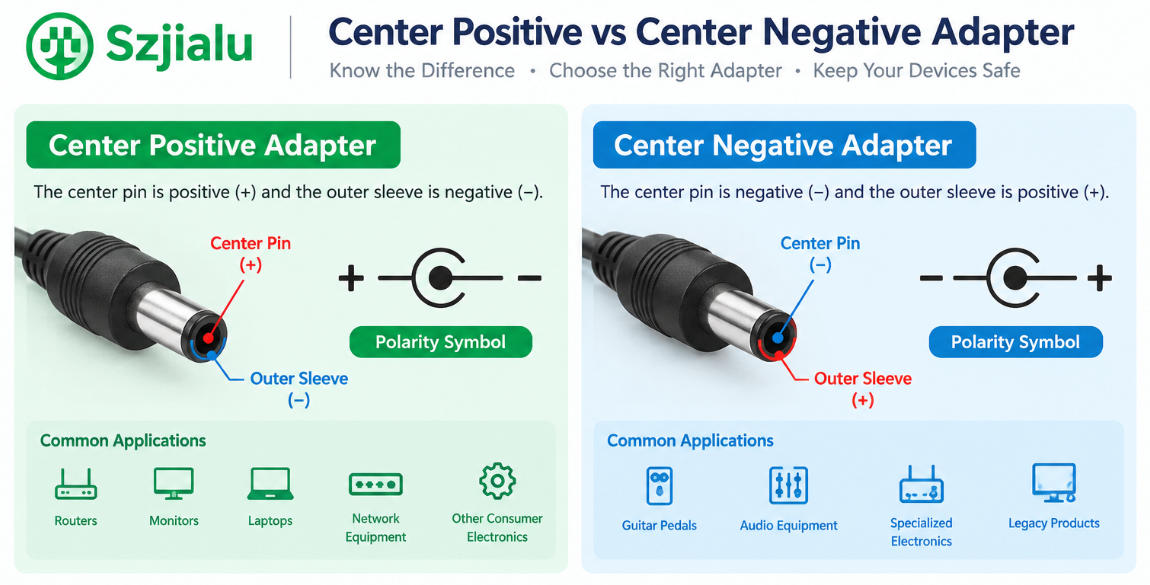
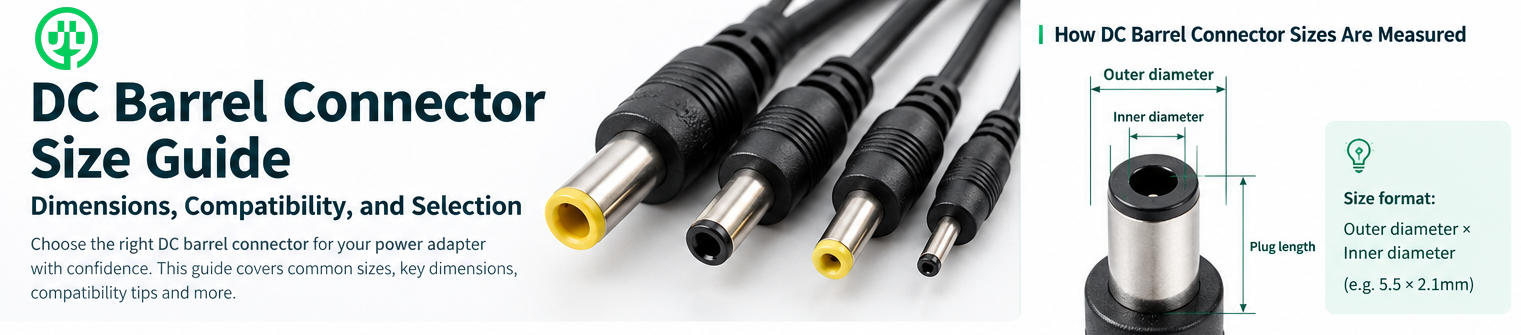
DC barrel connectors that look similar may have different outer diameters, inner diameters, pin structures, or polarity.
Using an incorrect connector can result in:
- No electrical contact
- Intermittent operation
- Excessive connector heating
- Damage to the device’s power jack
- Reverse-polarity damage
- Accidental short circuits
Never force a plug into a device. Confirm the connector dimensions and center polarity before connection.
For OEM projects, connector selection should include mechanical fit, contact resistance, mating-cycle durability, cable strain relief, and the expected operating current. A connector that technically fits may still be unsuitable for high-current or frequently connected equipment.
8. The Adapter Shuts Down Under Load
Many modern adapters include overcurrent, overload, short-circuit, and overtemperature protection. When abnormal conditions occur, the adapter may shut down to prevent damage.
Shutdown under load can be caused by:
- A device drawing excessive startup current
- A motor, display, or amplifier producing temporary peak demand
- A partially shorted cable
- A defective device
- An adapter with insufficient wattage
- Restricted airflow
- Internal component degradation
The continuous rating is important, but manufacturers should also evaluate peak power, startup behavior, and transient demand.
Higher-power equipment is often better suited to a desktop power supply because the larger enclosure can provide more space for components and thermal management. The comparison of wall power adapters and desktop adapters can help buyers choose the appropriate structure.
9. The Adapter Causes Interference or Device Malfunctions
Poor filtering or electromagnetic compatibility can allow switching noise to affect nearby electronics.
Possible symptoms include:
- Noise in speakers or audio equipment
- Lines or flicker on displays
- Wireless communication instability
- Sensor-reading errors
- Touchscreen interference
- Data-communication failures
The problem may originate from the adapter, output cable, device grounding arrangement, or overall system design.
For sensitive applications, buyers should evaluate conducted emissions, radiated emissions, ripple, shielding, cable routing, grounding, and immunity requirements. Choosing a certified adapter is important, but the complete finished product may still require system-level electromagnetic-compatibility testing.
10. The Adapter Smells Burnt or Shows Physical Damage
Stop using the adapter immediately when you notice:
- A burning or chemical smell
- Melted plastic
- Darkened areas
- Cracks in the enclosure
- Exposed conductors
- Corroded pins
- Loose internal parts
- Sparks or smoke
Do not attempt to repair physical damage with ordinary tape or glue. The insulation, strain relief, creepage distance, and enclosure integrity are part of the adapter’s safety system.
Replacement is usually safer and more economical than repairing a sealed external power supply.
Safe AC DC Power Adapter Troubleshooting Checklist
Use the following process before replacing an adapter:
- Disconnect the adapter if there is smoke, odor, melting, or excessive heat.
- Test the wall outlet with another device.
- Confirm the adapter input range matches the local mains supply.
- Verify output voltage, current capacity, polarity, and connector size.
- Inspect the AC plug, DC cable, connector, and enclosure.
- Remove extension cables or unnecessary plug converters.
- Test the device with a known compatible adapter when available.
- Check whether the problem appears only under heavy load.
- Move the adapter to a cooler, well-ventilated location.
- Replace the adapter if the fault remains or safe operation is uncertain.
Never open a sealed mains-powered adapter unless you are a qualified technician with appropriate equipment and safety procedures.
How to Prevent Power Adapter Problems
Many failures can be prevented through correct selection and use.
Provide Adequate Power Margin
Do not choose an adapter that must operate at its maximum rating continuously. Appropriate power margin helps support startup current, load variation, component tolerance, and environmental temperature.
Protect the Cable
Avoid pulling the adapter by its cable, wrapping the cable tightly around the enclosure, or bending it repeatedly near the strain relief.
Maintain Ventilation
Keep the adapter away from soft coverings, sealed spaces, direct sunlight, and other heat sources.
Use the Correct Specification
Voltage must match the device requirement. Current capacity should equal or exceed the required current, while polarity and connector dimensions must be correct.
Choose Suitable Protection Functions
Depending on the application, the adapter may require short-circuit protection, overcurrent protection, overvoltage protection, overload protection, and overtemperature protection.
Work With an Experienced Manufacturer
For product developers and bulk buyers, long-term reliability depends on more than the printed voltage and wattage.
Szjialu manufactures wall-mount, desktop, interchangeable-plug, USB, and other AC DC power adapter solutions. Its OEM and ODM power adapter service supports customized output specifications, plugs, cables, connectors, housings, labels, packaging, and certification requirements.
When Should an AC DC Power Adapter Be Replaced?
Replace an adapter when:
- The cable or connector is physically damaged
- The enclosure is cracked, melted, or discolored
- It produces a burning smell
- It becomes unusually hot
- Output is intermittent or unstable
- It shuts down repeatedly under a normal load
- It makes abnormal clicking or loud buzzing
- It no longer provides the required voltage
- It has been exposed to water or severe impact
- Its safety or compatibility cannot be confirmed
Always choose a replacement with the correct output voltage, sufficient current, correct polarity, compatible connector, suitable plug, and appropriate safety certifications.
Abschluss
Common AC DC power adapter problems include complete power loss, intermittent operation, overheating, abnormal noise, low output voltage, slow charging, loose connectors, overload shutdown, electromagnetic interference, and physical damage.
The safest troubleshooting approach begins with the wall outlet, external cables, connector compatibility, electrical ratings, operating load, and ventilation. Adapters showing smoke, melting, burning odors, exposed conductors, or severe overheating should be disconnected and replaced immediately.
For equipment manufacturers, many field failures can be avoided during product development. Correct wattage, reliable regulation, appropriate protection, thermal design, durable cables, suitable connectors, and verified safety compliance all contribute to a more dependable power system.
By working with an experienced power-supply manufacturer such as Szjialu, companies can develop AC DC adapters that match the electrical, mechanical, environmental, and regulatory requirements of their applications.